
System Bot
Moderation, protection, logs, tickets and community — in one bot
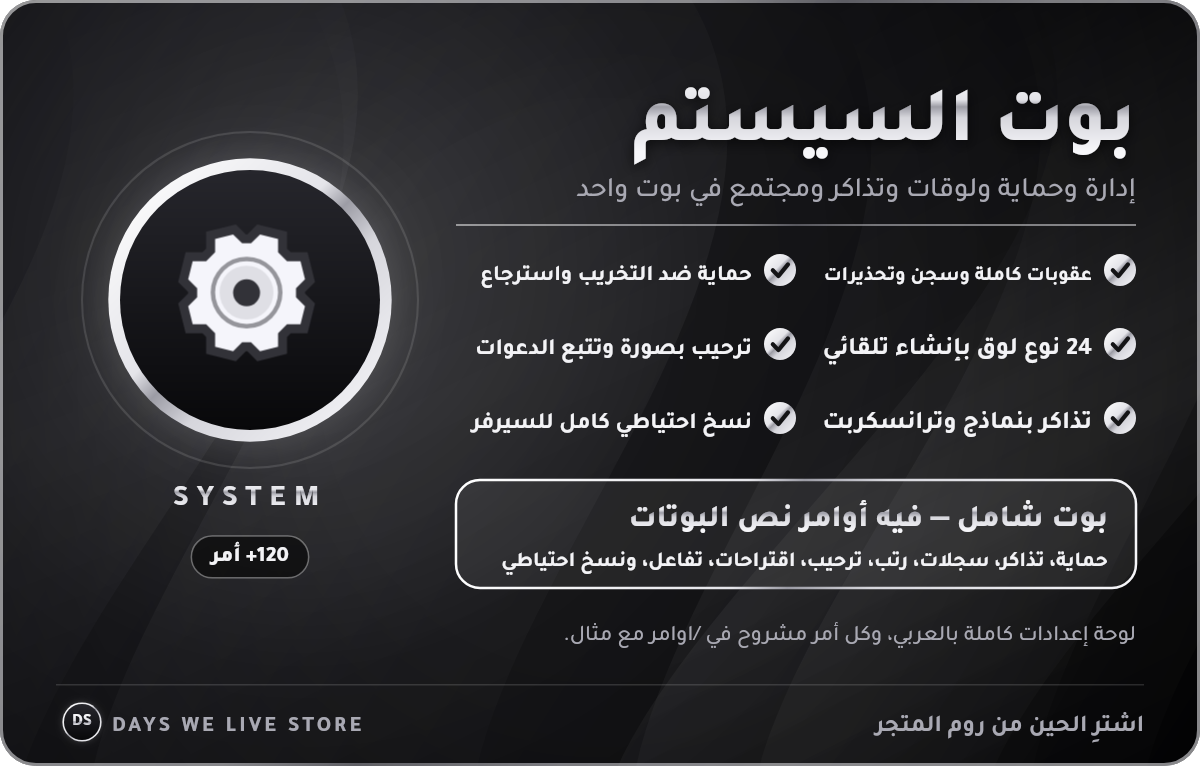
The all-in-one bot — it replaces half your bot list
Protection, tickets, logs, roles, welcome messages, suggestions, engagement and full backups
What does it do?
Every server starts from a clean slate: all settings begin empty, and any feature that needs a channel or role stays off until the server owner sets it up.
| Category | Features |
|---|---|
| 🔨 Moderation | Ban, kick, text and voice mute, timeout, jail, voice block, warnings, message purge, moving members, preset punishment reasons, a complete punishment log, and timers that carry on after a restart |
| 🛡️ Protection | Guards against deletions, creations, permission edits, server changes, kicks, added bots and granting restricted roles; new-account filter; trusted lists; automatic restore; punishment for saboteurs; protection logs |
| 💬 Chat Protection | Anti-spam, word filter, link blocker, protected channels and webhook protection |
| 📜 Logs | 24 log types (messages, members, roles, channels, voice, invites, emojis, punishments…) with automatic channel creation |
| 👋 Welcome | Image welcome card, welcome message, temporary join mention, invite tracking, nickname prefix (off by default) |
| 🎫 Tickets | Ticket panel with a select menu and forms, support team, claim and close, transcripts, DM on close |
| 📈 Activity | Text and voice points, reward roles, leaderboards |
| 🎨 Colors | Color roles, color palette image, color picker menu, colors channel |
| 🎭 Roles | Give and remove roles, auto roles, reaction and button roles, bulk roles, role icons |
| 💬 Channels | Lock and hide, send messages as the bot, auto-replies, auto divider, auto reactions, image-only channel, auto-clear, ratings and suggestions |
| 🔊 Voice | Keep the bot in a voice channel 24/7, voice channel counters |
| 💾 Backups | Full server backup and restore, copy messages from one channel to another |
| ⚙️ Settings | Full control panel (/لوحة or $panel), per-command permissions, shortcuts, prefix-free commands, command channel routing, language and prefix |
Ready in minutes
Once the bot is in your server:
- 1Invite the bot with the Administrator permission and move its role above the roles it manages.
- 2Type
/اوامرor$helpto see every command with explanations and examples. - 3Open the control panel with
/لوحةor$paneland configure the modules you need. - 4The server owner sets up each module with commands like
$protection,$logs setupand$tipanel.
Pick your plan
Pricing is coming soon
We’re finalising our prices — follow our server to hear the moment they go live.
Get announcements on our server📋 Command list
The full list, including subcommands and examples, is available inside the bot via /اوامر (commands list). $ is the default prefix, and each command's slash version, where one exists, is shown next to it. Server owner means the server owner or the subscription holder; Staff means a member who has permission to use the command (adjustable with $cmd and $allow).
🌐 General Commands (10)
$help·/اوامر— Help menu — Everyone$avatar·/افتار— Show someone's banner and avatar — Everyone$server·/سيرفر— Show server information — Everyone$semoji·/صورة-ايموجي— Get the image of an emoji or sticker — Everyone$change·/فلتر-صورة— Apply a filter to an image — Everyone$ping·/بنق— Check the bot's connection speed — Everyone$botinfo·/معلومات-البوت— Bot information: uptime, memory and versions — Everyone$userinfo·/معلومات-عضو— Member information: account, join date, roles and permissions — Everyone$roleinfo·/معلومات-رتبة— Role information: color, members and permissions — Everyone$myinv·/دعواتي— See how many invites you have — Everyone
🔨 Moderation Commands (24)
$ban·/حظر— Ban a member from the server — Staff$unban— Unban a member (orunban allto unban everyone) — Server owner$banslist·/قائمة-المحظورين— Show the list of banned members — Staff$kick·/طرد— Kick a member from the server — Staff$mute·/اسكات— Text-mute a member — Staff$unmute·/فك-الاسكات— Remove a text mute — Staff$vmute·/ميوت-صوتي— Voice-mute a member — Staff$unvmute·/فك-الميوت-الصوتي— Remove a voice mute — Staff$timeout·/تايم-اوت— Time out a member — Staff$untimeout·/فك-التايم— Remove a timeout — Staff$prison·/سجن— Jail a member — Staff$unprison·/عفو— Release a member from jail — Staff$seeyou·/سييو— Temporarily block a member from joining voice — Staff$unseeyou·/فك-سييو— Lift a member's voice block — Staff$warn·/تحذير— Warn a member — Staff$dwarn·/مسح-تحذير— Remove a warning from a member — Staff$mypunishments·/عقوباتي— View punishments and warnings — Staff$clear·/مسح— Delete messages from a channel — Staff$move·/سحب— Move a member into your voice channel — Staff$moveall·/سحب-الكل— Move all members into another channel — Staff$movemy·/سحبني— Move yourself into another member's channel — Staff$setreasons— Set the preset punishment reasons — Server owner$setchannel— Set the channels exempt from punishment roles — Server owner$setrole— Set up and assign the bot's roles — Server owner
🎭 Role Commands (8)
$role·/رول— Give or remove a role from a member — Staff$here·/هير— Give a member the Here role — Staff$live·/لايف— Give a member the streaming role — Staff$pic·/صور— Give a member the images role — Staff$setauto— Set the auto roles — Server owner$rolemulti— Add a role to a group of members — Server owner$reactrole— Reaction roles (subcommands: add, remove, list, buttons) — Server owner$addicon·/ايقونة-رول— Add or change a role's icon — Staff
💬 Channel Commands (16)
$lock·/قفل— Lock the channel (with an optional duration before it reopens automatically) — Staff$unlock·/فتح— Unlock the channel — Staff$hide·/اخفاء— Hide a channel — Staff$unhide·/اظهار— Unhide a channel — Staff$say·/ارسال-رسالة— Send a message or image as the bot in a channel — Staff$applay·/تفعيل-الشات— Enable mentions and images in the channel — Staff$disapplay·/تعطيل-الشات— Disable mentions and images in the channel — Staff$setpic·/شات-الصور— Set or remove a dedicated channel for images and videos — Staff$addautoreply·/اضافة-رد-تلقائي— Add an auto-reply — Staff$delautoreply·/حذف-رد-تلقائي— Delete an auto-reply — Staff$autoline·/فاصل— Automatic divider line in a channel (subcommands: set, remove, list) — Staff$unline— Turn off the automatic divider in a channel — Staff$setreact·/رياكشن-تلقائي— Automatic reactions in a channel (subcommands: set, remove, list) — Staff$unreact— Turn off automatic reactions in a channel — Staff$setclear·/تحديد-تنظيف— Set or turn off an auto-clear channel (subcommands: set, off, show) — Staff$rsettings— Set up the ratings channel and images — Server owner
🛡️ Protection Commands (21)
$protection— Control menu for protection settings and status — Server owner$antidelete— Protection against deleting roles and channels (subcommands: on, off, status) — Server owner$anticreate— Protection against creating roles and channels (subcommands: on, off, status) — Server owner$antiperms— Protection against editing role and channel permissions (subcommands: on, off, status) — Server owner$antiicon— Protection against changing the server name and icon (subcommands: on, off, status) — Server owner$antikick— Protection against members being kicked (subcommands: on, off, status) — Server owner$antibots— Block bots from being added to the server (subcommands: on, off, status) — Server owner$antirolegive— Block restricted roles from being granted (subcommands: on, off, status) — Server owner$antijoin— Ban or jail new accounts (subcommands: on, off, time, info) — Server owner$setrjoin— Choose the action taken against new accounts — Server owner$setpunishment— Choose the punishment applied when sabotage is detected — Server owner$wanti— Trusted list for creating and deleting roles and channels (listto view) (subcommands: toggle, list) — Server owner$trust— Trusted list for bypassing bot, kick and permission protection (listto view) (subcommands: toggle, list) — Server owner$wantichat— Trusted list for bypassing the spam, link and word filters (listto view) (subcommands: toggle, list) — Server owner$lockrole— Set the roles that can't be granted to members (subcommands: toggle, list) — Server owner$logsec— Create the protection logs — Server owner$bots·/بوتات— List every bot in the server — Staff$spam— Set up and adjust spam protection — Server owner$antiword— Profanity and slur filter that instantly mutes the offender (subcommands: toggle, enable, disable, list, add, remove, mode) — Server owner$links-protection— Block links from being posted — Server owner$protect·/حماية-الروم— Protect a specific channel (deletes messages from non-exempt members + timeout), plus webhook protection and a warning message — Staff
⚙️ Settings Commands (13)
$panel·/لوحة— Bot settings control panel (each section follows its commands' permissions) — Everyone$cmd— Edit a command's settings, permissions and behavior — Server owner$allow— Allow or deny a member or role the use of a command — Server owner$list— Permissions table for members and roles — Server owner$noprefix— Use commands with or without a prefix — Server owner$mperm— Manage permissions for a category's channels — Server owner$aemoji·/اضافة-ايموجي— Add a new emoji to the server — Staff$stickers·/ستيكر— Add a new sticker to the server — Staff$prefix— View or change the bot's command prefix in this server — Server owner$language— View or change the bot's language in this server — Server owner$chatroute·/تحديد-شات— Set the channels for staff commands and member commands, and move or merge logs — Staff$backup·/نسخة— Server backups: create, view, delete and restore (subcommands: create, list, info, delete, restore, help) — Staff$archive·/نقل— Copy every message from one channel to another via webhook — Staff
📜 Log Commands (1)
$logs— Set up, assign and delete all logs (subcommands: setup, list) — Server owner
👋 Welcome Commands (3)
$editwlc— Edit the welcome: image, element positions, channel and message — Server owner$setjoinmessage·/رسالة-الدخول— Temporary join message that mentions the new member (subcommands: set, off) — Staff$setnicks·/بادئة-الجميع— Add a nickname prefix to every member (subcommands: apply, remove) — Staff
📈 Activity Commands (4)
$rank·/تواجدي— Show a member's detailed activity stats — Everyone$top·/توب— Show the invite and activity leaderboards — Everyone$check·/فحص-رتبة— Show who has a role and how active they are — Staff$setlevel— Set up and enable the points system (subcommands: panel, status, enable, disable, ignore, addrole, removerole, reset, resetall, sync) — Server owner
🎨 Color Commands (4)
$color·/لون— Pick a color by its role number (numbered color roles only) — Everyone$colors·/الوان— Color palette — Everyone$mcolors·/قائمة-الالوان— Pick your color from a menu — Everyone$setcolors— Customize the colors channel and system (subcommands: panel, channel, disable, shape, interval, mode, background, external, remove-image, range, post, create-roles, recolor, delete-roles) — Server owner
🔊 Voice Commands (3)
$join— Keep the bot in a voice channel — Server owner$leave— Disconnect the bot from voice and stop keeping it there — Server owner$setvoice— Set up voice channel counters (subcommands: add, list, remove) — Server owner
🎫 Ticket Commands (6)
$tipanel— Set up and configure the ticket system — Server owner$tsetupchat— Post the ticket panel in a channel — Server owner$add·/اضافة-عضو— Add someone to the ticket — Everyone$remove·/ازالة-عضو— Remove someone from the ticket — Everyone$rename·/تسمية-التذكرة— Rename the ticket — Everyone$close·/اغلاق— Close the ticket — Everyone
👑 Bot Commands (5)
$dm— DM a member or every member of a role (subcommands: send, status, cancel) — Bot owner$owners— Add or remove a bot admin (listto view) (subcommands: list, add, remove, toggle) — Bot owner$vip— Manage the bot's name, avatar, banner and status (subcommands: menu, name, avatar, banner, status, presence) — Bot owner$guilds— The bot's servers: list them or leave one (subcommands: list, leave) — Bot owner$system— System status: uptime, memory, event loop, database and versions — Bot owner
Ready to get started?
Join our server, or pick your bot and buy it now with your Discord ID — no sign-up, delivered instantly.